Type
Projection alarm clocks
Compare angle, focus, orientation, brightness, power, and display timeout.
Compare projection models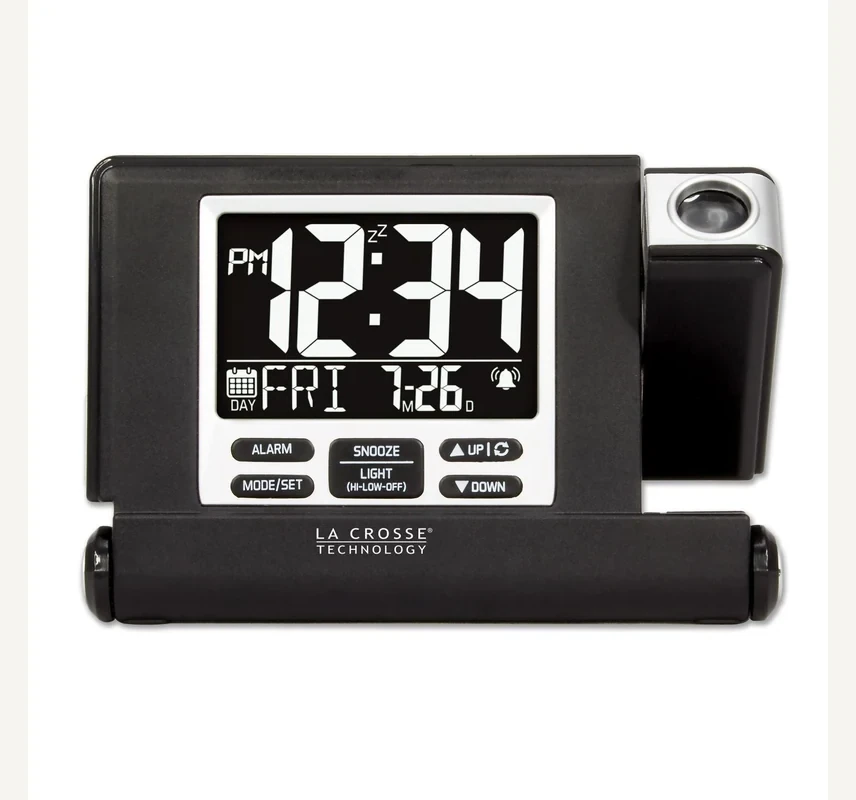
Travel Projection Alarm Review
The 616A-56647V2 folds into its own protective cover and projects red time onto a wall or ceiling. Two AAA batteries keep the clock usable, while the included USB-C cable is required for constant projection, constant backlight, and external-device charging.
Bottom line
Choose it when projection and a folding travel case solve a real hotel-room problem. Do not buy it expecting an all-night battery projector or fast phone charger: battery light/projection lasts ten seconds per press, and output is limited to 1 A.
Independent desk-researched review based on La Crosse Technology’s current product page, June 2024 USB-C setup guide, exact official model images, and explicit power-mode boundaries. No personal-use claim is implied.
Direct product link
La Crosse 616A-56647V2Confirm the V2 USB-C model and included cable; older or similar-looking listings can have different ports.Check on AmazonPower boundary
Batteries do not mean constant projectionBattery-only projection and backlight appear for ten seconds after SNOOZE/LIGHT is pressed.Compare power modesCategory context
Compare projection clocksEvaluate focus, orientation, brightness, power, alarm force, and room geometry.Open the projection guideRelated Clock Guides
A ceiling display is valuable from the pillow, not on a specification list. These routes test the room, trip, display, charging, and alarm assumptions around it.
Quick Verdict
The answer changes what the 616A-56647V2 is. With two AAA batteries alone, it is a compact travel alarm whose display, backlight, and projection can be checked for ten seconds by pressing SNOOZE/LIGHT. With the included USB-C cable connected to a suitable USB source, it becomes a continuously illuminated projection clock with adjustable backlight and a usable charging output.
That split is not a minor footnote. Product photographs naturally emphasize a glowing display and red projection, while “battery power” can suggest the same scene without a cable. La Crosse’s current setup guide is explicit: constant backlight and constant projection require the included USB-C power cable. Battery mode preserves portability by turning those loads into brief requested views.
The folding cover is the genuinely travel-specific idea. Closed, it protects the LCD and controls. Open, it becomes the stand. Button functions are printed inside the cover, reducing the need to find instructions in a hotel room. The clock measures about 4.56 inches long and less than an inch thick when closed, so it packs more like a small case than a conventional projection clock.
The alarm is a 73 dB beeper that increases in frequency and stops automatically after two minutes if it is not silenced. Snooze is ten minutes. This is a conventional travel alarm level, not a specialist heavy-sleeper system. Projection improves time access; it does not make the wake signal stronger.
The 1 A USB-C output is a convenience port, not a reason to replace a modern phone charger. It works only while the clock itself is connected to USB-C power. La Crosse says the clock was not designed to charge tablets or other devices requiring more than 1 A. A traveler who needs fast charging should keep the normal charger and treat the clock’s output as optional.
USB-C and Battery Modes
La Crosse’s product page lists two AAA batteries as required and not included. The setup guide begins by installing them before the cover is opened. The included USB-C cable is described as optional power for constant adjustable backlight and projection, even though it is required for those full display functions.
On battery power, pressing SNOOZE/LIGHT activates both the backlight and projected image for ten seconds. This protects the published battery life of more than six months without AC. The figure is a manufacturer claim, not an observed result in this review. Battery brand, age, alarm use, temperature, and repeated illumination will affect actual life.
On USB-C power, the SNOOZE/LIGHT button cycles the backlight through high, low, and off. Projection can remain constant. The manual says the clock can work with USB power bricks up to 5 A; the clock draws what it needs. The cable can also connect to a computer USB port. A wall power adapter is not clearly listed as included, so verify what USB source will be available at the destination.
The two power paths create useful resilience. If hotel USB power is lost, installed AAA batteries can keep the clock function available. Do not assume the same bright display and projection remain on during the outage. The manual’s battery-mode behavior still applies: press for a ten-second view.
A good travel routine uses fresh matched batteries and the USB-C cable. The batteries avoid waking to a reset clock after a loose cable or switched hotel outlet. The cable provides the expected projection experience. Neither path should be omitted simply because the other exists.
| Function | AAA battery only | USB-C connected |
|---|---|---|
| Clock and alarm | Available with required batteries | Available; keep batteries installed for resilience |
| Backlight | Ten seconds per press | High, low, or off continuously |
| Projection | Ten seconds per press | Constant projection available |
| External charging | Unavailable | Up to 1 A from USB-C OUT |
| Main benefit | Portable low-drain operation | Full bedside display behavior |
Projection Geometry
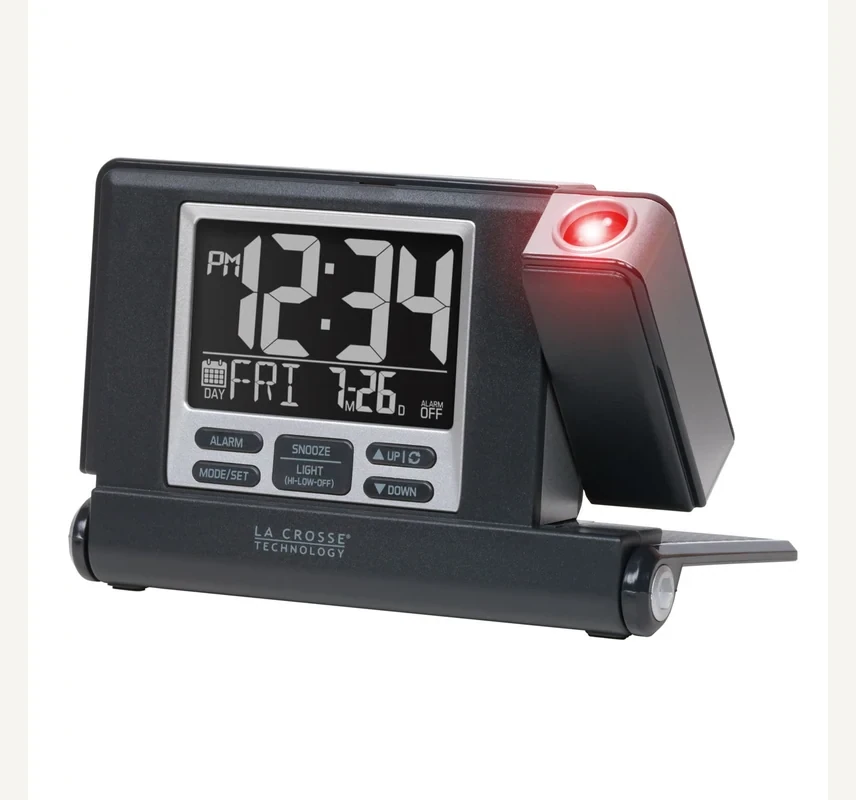
The red projected digits can be aimed at a wall or ceiling. The projection arm tilts forward and backward, while pressing the UP button rotates the image in 90-degree increments. La Crosse describes the projector as auto focus. That avoids a small manual focus wheel, but it does not remove the need to find a clear surface, comfortable angle, and useful reading direction.
Position the open clock where the arm can point without being blocked by a headboard, lamp, shelf, or raised edge of the nightstand. From the pillow, identify a ceiling or wall area that does not require turning the head uncomfortably. Rotate the digits until they are upright from the sleeping position, not from the side of the bed where setup occurs.
Projection visibility depends on ambient light, surface color, texture, distance, and personal contrast sensitivity. Red digits can appear crisp on a plain light ceiling and softer on textured paint. The product page does not publish a projection distance range or brightness control separate from the main behavior, so do not promise the same result in a tall hotel room and a low bedroom.
Constant projection can itself become a sleep disturbance. Aim it away from the direct visual field if the red light feels intrusive. The battery-only ten-second mode can actually be the better fit for a light-sensitive sleeper: press when time is needed, then let the room go dark again. A feature is valuable only when its always-on state is wanted.
Folding Cover and Travel
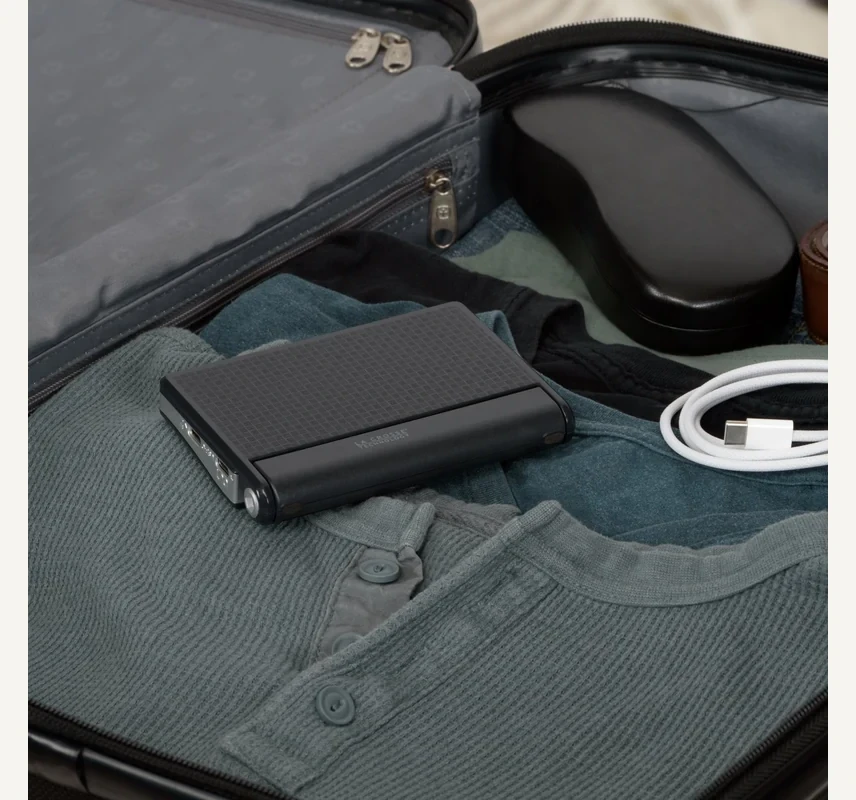
Open dimensions are listed as 4.56 inches long, 3.13 inches wide, and 3.11 inches high. Closed dimensions are 4.56 inches long, 0.94 inches wide, and 3.14 inches high. Closing the front turns a three-dimensional bedside stand into a flat protected package. The same cover becomes the support when opened.
That design shields the LCD, front buttons, and projection assembly from direct pressure in luggage. It does not make the clock impact-proof or waterproof. Pack it in a stable section of a carry-on, away from a heavy laptop corner or liquids. The USB-C cable should be coiled separately so its connector does not press against the screen.
Button functions printed inside the cover solve a common travel failure: arriving tired and forgetting which long press enters settings. The current setup flow is conventional. Hold MODE/SET, use UP or DOWN, and press MODE/SET to confirm 12/24-hour format, hour, minutes, year, month, and date. The weekday follows the date.
Time-zone travel remains manual. There is no radio-controlled, GPS, Bluetooth, or Wi-Fi correction. Change the time after arrival, then inspect the alarm because current time and alarm time are separate. A projected image can look perfectly correct while the alarm remains set for the previous schedule.
The front cover requires a firm pull to open according to the setup guide. Practice before packing and avoid forcing the hinge sideways. The compact closed shape is useful for business travel and hotels; campers still need a dry environment, two healthy AAA batteries, and realistic expectations about constant projection without a USB source.
Alarm and LCD
The main time digits are 1.85 inches tall and can display 12- or 24-hour format. The lower area can switch between calendar information and alarm time. White LCD digits offer strong contrast when the backlight is active. High, low, and off settings on USB-C power provide a basic night-brightness choice.
The alarm is set by pressing ALARM to display the alarm time and holding ALARM to enter settings. UP and DOWN change hour and minutes; ALARM confirms. The current guide describes one alarm sequence and an alarm icon that shows when it is active. Do not interpret the marketing phrase “time alarms” as proof of dual independent alarms.
When sounding, the beeper increases in frequency for two minutes and then stops automatically if it is not silenced. The official specification is 73 dB. Press SNOOZE/LIGHT for a ten-minute snooze, or press another button to silence the alarm for 24 hours. Learn that distinction before an early trip: the largest convenient control postpones, while ending the cycle uses a different action.
Seventy-three decibels should not be compared directly with an extra-loud 100–113 dB accessibility clock. Measurement distance and method matter, and the La Crosse page is not positioning this model as a heavy-sleeper alarm. Its wake performance is better suited to an average sleeper who chose the model for display and travel utility.
The calendar can reduce phone checks, but the year, month, and date must be correct for weekday information to be correct. After battery removal or a full reset, walk through the entire settings order instead of stopping after the time appears right.
USB-C Output
The clock provides a USB-C OUT charging port with a maximum current of 1 A. External charging works only while the clock is connected to USB-C power. A separate device cable is required. La Crosse specifies self-regulating devices and warns that the clock was not designed to charge tablets or devices requiring more than 1 A.
That output can top up a small compatible device overnight or reduce competition for a hotel USB source. It will not reproduce the charging speed of a modern USB Power Delivery adapter. Phone charging time varies, and a power-hungry phone may gain charge slowly while in active use.
Port direction matters because both input and output use USB-C. Read the labels before connecting. The included cable powers the clock; the phone’s own cable connects to the output. If the wall adapter has only one port, the clock becomes part of the charging chain and therefore another possible point of failure.
Keep the primary phone charger for travel if battery state matters. Treat the clock output as a convenience rather than a promise that every device can be charged. This framing prevents a useful secondary feature from becoming the reason the wrong clock is purchased.
Setup and Recovery
The guide explicitly says to press or hold only one button at a time while adjusting settings. Hold MODE/SET to enter the menu, change values with UP or DOWN, and confirm with MODE/SET. Holding an arrow accelerates changes. The order continues through time format, time, and calendar.
If the clock behaves unexpectedly, La Crosse’s restart process is unusually specific: disconnect USB-C, remove the batteries, press any button twenty times, wait fifteen minutes, then power up again. That process is intended to discharge residual state. It should not be replaced with random button combinations.
Before a critical trip, set the alarm for five minutes ahead in both power modes. Disconnect USB-C and verify the clock and alarm remain configured. Press SNOOZE/LIGHT and observe the ten-second display/projection. Reconnect USB-C, choose the backlight level, and confirm constant projection. Finally, charge a low-stakes device long enough to verify the OUT port and cable.
Alternatives
| Requirement | 616A fit | Better route if it fails |
|---|---|---|
| Protected travel packing | Strong: folding cover becomes stand | A smaller analog travel clock if projection is unnecessary |
| Constant ceiling time | Strong with USB-C power | A fixed bedside projector if travel is irrelevant |
| Cable-free constant projection | Not supported | No low-drain travel projector is likely to meet that expectation |
| Fast device charging | Weak: 1 A maximum | A dedicated USB-PD charger or charging clock |
| Heavy-sleeper waking | Weak: conventional 73 dB beeper | A loud alarm, bed shaker, or multimodal clock |
| Automatic time zones | None | A phone-synced or radio-controlled model |
A Braun BC02 removes projection and USB functions in exchange for a smaller one-AA analog package. It fits the traveler who wants a dark room, simple alarm, and no cable. A larger home projection clock can add dual alarms, more projection controls, or stronger charging but usually loses the protective folding case.
Choose the 616A because ceiling or wall time is genuinely easier to read from the pillow and because the two-mode power behavior is acceptable. Without that need, the projector, cable, and orientation controls are complexity rather than value.
Evidence Boundary
La Crosse’s current page and setup guide support the exact dimensions, 1.85-inch digits, 73 dB alarm, two-minute duration, ten-minute snooze, 90-degree projection rotation, auto focus, 1 A output, required AAA batteries, and USB-C behavior. The guide is especially important because it states the ten-second battery display and constant-USB requirement.
We did not measure projection brightness, verify maximum focus distance, run a six-month battery test, measure USB output under load, or sleep-test the 73 dB alarm. Those values are therefore not converted into subjective ratings. The review identifies what is documented and what should be tested in the real room.
Final Verdict
The folding cover, printed controls, compact closed profile, adjustable red projection, large LCD, required backup batteries, and included USB-C cable form a coherent travel design. It can arrive protected, open into a stable stand, and give constant ceiling time in a powered hotel room.
Its limits are not defects once they are understood. Battery mode gives brief light and projection, not an all-night image. The alarm is conventional rather than extra loud. The charging output is slow by current phone standards. Buy it when projection solves the viewing problem and USB-C power is expected. Choose a simpler or more forceful category when those conditions are not true.
FAQ
No. In battery-only mode, pressing SNOOZE/LIGHT shows the backlight and projection for ten seconds. Constant projection requires the included USB-C cable connected to a suitable USB power source.
La Crosse lists two AAA batteries as required and not included. Install matched batteries even when USB-C will normally power the clock so the low-drain clock function has its intended battery path.
The current product page lists a USB-C to USB-C power cord. The guide describes connecting it to a computer port, USB power brick, or outlet, but does not clearly list a wall adapter in the package. Verify the power source you will use.
La Crosse specifies 73 dB. It increases in frequency for two minutes and then stops automatically if not silenced. It is not documented as an extra-loud heavy-sleeper alarm.
Yes. The projection arm tilts forward and backward, and pressing the UP button rotates the projected image in 90-degree increments. Auto focus does not remove the need to choose a suitable wall or ceiling position.
Ten minutes. Press SNOOZE/LIGHT while the alarm sounds. Pressing another button silences the alarm for 24 hours according to the setup guide.
The USB-C output is limited to 1 A and works only while the clock has USB-C input power. La Crosse says it is not designed for tablets or devices requiring more than 1 A. Keep a dedicated fast charger when charging speed matters.
La Crosse lists 4.56 inches long, 0.94 inches wide, and 3.14 inches high when closed. The front cover protects the display and controls and becomes the stand when opened.
No automatic radio, Bluetooth, GPS, or Wi-Fi correction is listed. Set local time manually after travel and then recheck the separate alarm time.
Editorial Review Notes
A traveler who wants protected packing and ceiling time, with USB-C power available for full display behavior.
Battery-only backlight and projection last ten seconds per press; the charging output is only 1 A.
Power modes, alarm timing, dimensions, charging limit, and setup steps come from the current official page and USB-C setup guide.
This is an editorial model assessment, not a customer-submitted rating. No measured brightness, projection range, USB charging speed, battery runtime, or personal wake result is invented.
Sources