Feature
Charging alarm clocks
Compare pad power, device positions, wired ports, and shared limits.
Compare charging systems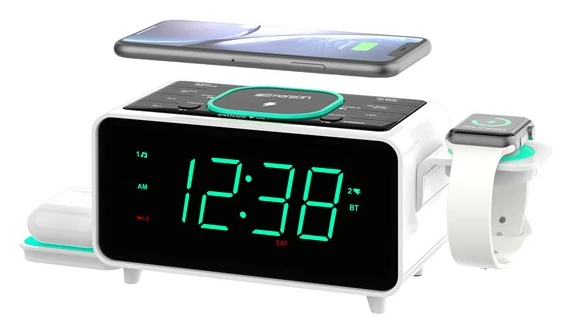
Multi-Device Charging Clock Review
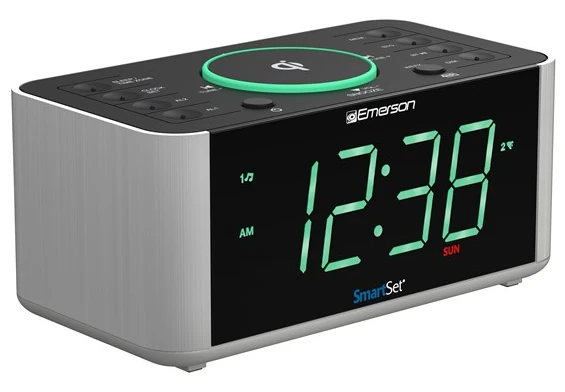
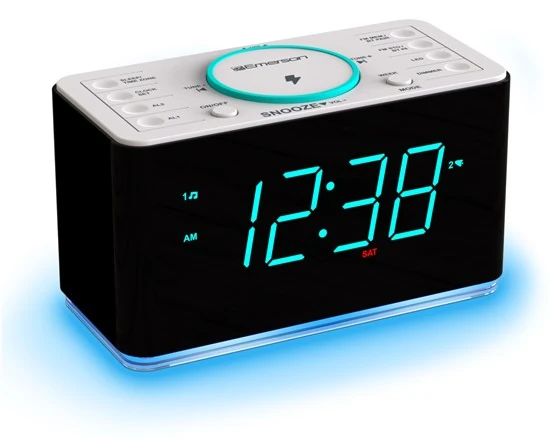
ER100501 combines a phone pad rated up to 15 W, a foldable 3 W earbud platform, a watch-charger cable holder, Type-A and Type-C USB connections, SmartSet, dual alarms, FM, Bluetooth 5.1, a cyan night light, and a large auto-dimmable display.
Bottom line
Choose ER100501 when the exact device set fits its physical charging map and the household accepts one shared AC dependency. The watch holder is not a watch charger by itself, and the USB connections should not be described as independent high-power PD ports.
Independent desk-researched review based on Emerson’s current ER100501 product page, exact owner’s manual, and exact official images. No hands-on, simultaneous maximum-rate, price, or stock claim is implied.
Direct product link
Emerson ER100501Confirm each device, case, cable, regional adapter, warranty, and exact package contents.Check price on AmazonThe first test
Map every real deviceAssign the phone, earbuds, watch cable, and USB accessories before judging the “five-in-one” claim.Build the device mapCategory context
Compare charging clocksSeparate physical positions, power limits, case fit, cable needs, and outage consequences.Open the charging guideRelated Clock Guides
These routes help separate charging, radio, broad feature coverage, outage memory, and the overall alarm fit.
Quick Verdict
ER100501 is a charging layout wrapped around a clock radio. The main top pad is rated up to 15 W for a compatible phone. A foldable side platform is rated 3 W for compatible earbuds. Another side structure holds a user-supplied watch charging cable. Type-A and Type-C USB connections add two wired paths. The front remains a 1.4-inch SmartSet clock with dual alarms, FM, Bluetooth, and cyan lighting.
The design can reclaim nightstand space when those exact devices are already present. It can also create misleading expectations. The watch side is a holder, not a universal embedded watch charger, and the required watch cable is not included. The Type-C connector should not be interpreted as USB-C Power Delivery merely because of its shape.
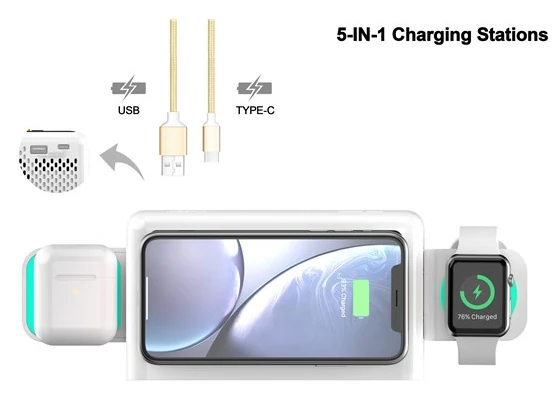
Emerson publishes a maximum 5 V/2.1 A for the USB charging arrangement. Do not assume each wired port supplies that amount independently while every wireless surface also runs at its maximum. A product illustration with several charging icons describes supported positions, not a laboratory promise of simultaneous peak delivery.
Physical fit matters as much as electricity. A phone case can affect Qi alignment. The earbud case must sit correctly on the foldable platform. The watch puck and cable must fit the holder without pulling. Connected cables must leave access to alarm and snooze controls. Measure the occupied nightstand, not only the clock cabinet.
All these paths share the clock’s AC supply. The button cell protects stored clock and alarm data; it does not power the charging station, display, radio, Bluetooth, night light, or normal alarm output during an outage. The more services ER100501 replaces, the more important an independent battery alarm becomes.
Five Charging Paths
The first position is the main phone pad. Emerson rates it up to 15 W. Place the exact phone in its normal case on the center of the pad and observe stable charging over time. A thick case, metal plate, wallet, ring, or off-center coil can change the result. Follow both Emerson and the phone maker’s guidance.
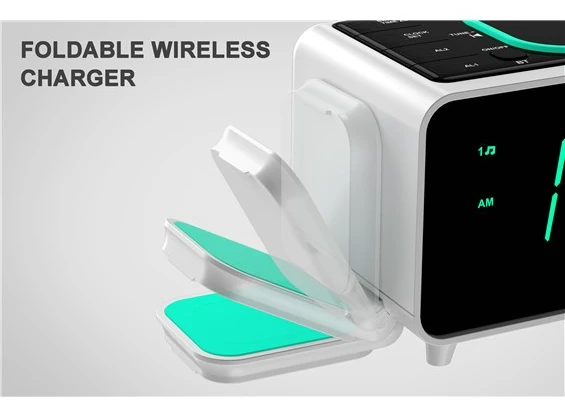
The second position is the foldable 3 W platform intended for compatible earbud cases. “AirPods charging” in marketing language should still be matched to the exact case. Wireless-capable and wired-only earbud cases can look similar. Open the platform, place the case as shown, and verify its own charging indicator.
The third position is a holder for a watch charging cable. The charging puck and cable are not included. The station organizes a compatible cable that the user already owns; it does not create cross-brand watch compatibility. Check puck diameter, cable bend, connector destination, and watch clearance.
The fourth and fifth paths are Type-A and Type-C USB. Connector shape does not establish protocol or independent power. The official limit given for this wired charging arrangement is 5 V/2.1 A. Use suitable cables and test the devices together under the expected overnight load.
If one position has no assigned device, discount it from the purchase decision. An unused watch holder or earbud shelf adds width and complexity without value. ER100501 is strongest for a specific ecosystem, not for an abstract desire to own more charging icons.
Power and Simultaneous Use
The main pad’s 15 W ceiling, earbud platform’s 3 W rating, and USB maximums describe capabilities under compatible conditions. Actual simultaneous behavior depends on the adapter, device negotiation, battery state, heat, and how Emerson allocates power internally. The current official material should be read conservatively unless it gives a more specific combined-output table.
Test the intended complete load during the return period. Begin with the phone alone, then earbuds, watch cable, and wired devices one at a time. Observe charging indicators, device temperature, unexpected disconnects, and whether moving one device affects another. Use the normal cases and cables.
Do not stack metal objects, keys, coins, magnetic cards, or unrelated accessories on wireless surfaces. Keep ventilation clear. A crowded charging station can accumulate cables over the cabinet and make the top alarm controls hard to reach.
The watch cable needs strain relief. Route it through the holder without a sharp bend at the puck or connector. Leave enough slack to place and remove the watch but not enough to form a loop beside the bed. The USB cables should exit toward the back or side without pulling the clock.
AC loss stops the shared system. A phone, earbuds, and watch may all fail to charge at the same time the clock loses normal alarm output. Keep an independent battery alarm and avoid starting the night with every device nearly empty when the morning is critical.
Phone, case, alignment, and protocol determine the result.
Confirm the exact wireless-capable charging case.
Watch charging puck and cable are not included.
Published USB maximum is 5 V/2.1 A, not a PD claim.
SmartSet and Dual Alarm Logic
SmartSet initializes stored year, date, day, and time information after AC connection. Select and verify the correct time zone, AM/PM state, and daylight-saving behavior. Automatic setup reduces button work; it does not know where the user lives.
The two alarms can follow every-day, weekday, or weekend recurrence and use radio or buzzer. Configure alarm one before arranging all charging devices around the cabinet. Learn its indicator, source, volume, snooze, and off action. Add the second alarm only when the first is unambiguous.
A phone across the top and devices on both sides can change how the controls are reached. Practice removing the phone and silencing the alarm without knocking the watch or pulling a USB cable. If the physical layout makes that difficult, fewer charging positions may produce a safer alarm.
Crescendo gradually raises the wake signal. Snooze delays it. A user who routinely misses the alarm should review wake modality and sleep opportunity rather than adding charging convenience to an inadequate signal.
The coin cell retains settings through an interruption. It is not a substitute for a battery alarm. Place the independent backup away from the same power strip so the two systems do not share the same failure.
FM, Bluetooth, Speaker, and Display
The FM tuner uses a wire antenna and stores 20 presets. Arrange all charging cables first, then extend and orient the antenna. USB and wireless charging electronics can change the noise environment. Test the station and volume selected for radio wake under the normal load.
Bluetooth 5.1 has a manufacturer-published range up to 10 meters in suitable conditions. Pairing supports phone audio through the clock. It does not make the phone the clock’s alarm scheduler. A sleep timer can stop listening playback, while the physical alarm remains a separate configuration.
Emerson lists a 2 W mono speaker at 10% THD with a passive radiator. That is a manufacturer specification, not a claim of high-fidelity sound. Use it to set expectations for a compact bedside speaker and test speech, music, and alarm content at the actual distance.
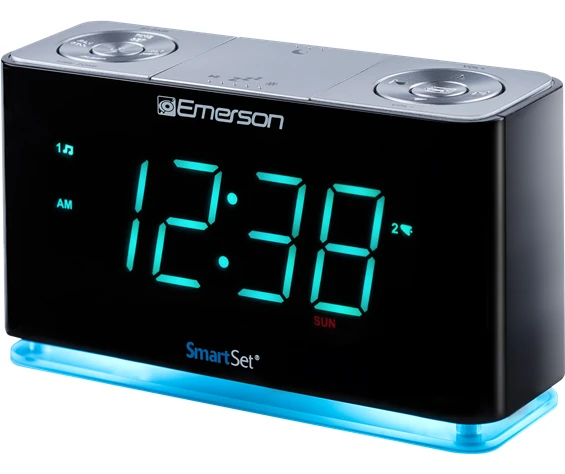
The 1.4-inch cyan display offers three manual brightness levels plus an automatic dimmer. The cyan night LED has two levels and off. Phone, watch, and earbud indicators add more light. Evaluate the entire charging ecosystem after dark; the clock’s dimmer cannot control every connected screen.
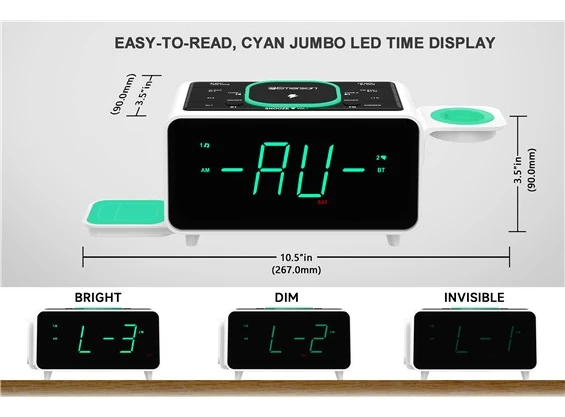
Nightstand Footprint
The official diagram shows a cabinet around 10.5 inches wide and 3.5 inches high, but the operational footprint expands when the side platforms and devices are in use. A watch protrudes on one side, earbuds occupy the other, a phone rests on top, and wired cables exit the cabinet.
Mark that rectangle on the nightstand before ordering. Leave clearance for a lamp, glass, book, and hand. Keep the phone away from a wall that prevents centered placement. Do not let the watch or earbud platform hang over the furniture edge.
The station reduces visual cable clutter only when cables are deliberately routed. Bundle neither the FM antenna nor charging leads tightly against the AC adapter. Keep ventilation open and prevent bedding from contacting the electronics.
Ten-Step System Test
Alternatives
Choose ER100202 when one Qi phone and one wired USB device cover the nightstand. Its simpler surface may be easier to reach and troubleshoot.
Choose ER100401 when one 15 W-class phone pad plus wired USB is enough. Its manual documents an FM-mute interaction during wireless charging, which must be tested against the routine.
Choose ER100301 when wired USB and a cyan orientation light matter but Qi does not. A cable can be more predictable than a wireless pad for a thick or accessorized phone case.
Choose separate certified chargers and a basic alarm when each device needs a specific high-power adapter or when an outage should not disable every function at once. Separate components occupy more outlets but can be replaced and tested independently.
If three charging positions and a buzzer-alarm routine cover the job, compare the iHome iW23. Check its modest wired outputs, date-dependent repeat rule and instruction revision before treating it as an alternative dock.
Evidence Boundary
Emerson’s current ER100501 page and exact manual establish the 15 W-class phone pad, 3 W earbud platform, foldable design, watch-cable holder with cable not included, Type-A and Type-C USB connections with a published 5 V/2.1 A maximum, SmartSet, dual recurring alarms, Bluetooth 5.1 up to 10 m, FM with 20 presets, 1.4-inch cyan display, manual and automatic dimming, two-level night LED, radio/buzzer wake, sleep timer, snooze, crescendo, and 2 W mono speaker specification.
We did not measure per-device wattage, simultaneous power allocation, charging time, temperature, speaker response, radio sensitivity, Bluetooth range, alarm loudness, or outage output. No hands-on use is claimed. The exact devices, cases, cables, and room must be tested together.
Price, stock, regional power accessories, and warranty can change. Confirm the current official listing and the exact model before purchase.
Final Verdict
The station can organize a compatible phone, wireless earbud case, owner-supplied watch cable, and two wired accessories around a capable SmartSet clock radio. For the right device ecosystem, that is meaningful consolidation rather than decoration.
The limits define the purchase: five positions are not five identical maximum-rate chargers, the watch puck is not included, USB-C shape does not promise PD, and AC loss affects the whole system. Buy ER100501 after mapping and testing every device. Choose a simpler clock when only one or two positions have real jobs.
FAQ
They are a main phone Qi pad, a foldable 3 W earbud platform, a holder for the owner’s watch charging cable, a USB Type-A connection, and a USB Type-C connection. They are not five identical chargers.
No. Emerson describes a watch charging cable holder, and the watch cable is not included. The user must supply a compatible puck and cable.
No USB-C PD claim should be inferred. Emerson publishes a 5 V/2.1 A maximum for the USB charging arrangement. Confirm the exact manual and device requirements.
No. The pad is rated up to 15 W. Actual power depends on phone support, Qi profile, case, alignment, temperature, and the station’s operating conditions.
The official charging illustration does not by itself establish simultaneous peak power for every position. Test the intended device set together and use any combined-output limits in the exact manual.
Two, with every-day, weekday, or weekend recurrence and radio or buzzer wake. Arrange devices so the alarm and snooze controls remain reachable.
The button cell preserves time and alarm settings. Do not assume it powers the display, alarms, radio, Bluetooth, lighting, or charging surfaces without AC.
It has FM with 20 presets, Bluetooth 5.1 with a published range up to 10 m, radio or buzzer alarms, and a manufacturer-listed 2 W mono speaker with passive radiator. No measured audio-quality claim is made here.
Choose ER100501 when the earbud platform, watch-cable holder, and two wired USB connections have assigned devices. Choose ER100401 when one phone pad and one wired USB path cover the need and its FM-charging interaction is acceptable.
Editorial Review Notes
A user with a known phone, wireless earbud case, compatible watch cable, and wired accessories who wants one organized physical clock-radio station.
The positions use different charging methods and shared AC power; the watch cable is not included and USB-C PD is not promised.
Specifications come from Emerson; no simultaneous maximum-rate, temperature, audio, or hands-on result is invented.
This is an editorial model assessment, not a customer-submitted rating. It does not claim measured charging rate, simultaneous power, heat, speaker quality, alarm loudness, price, stock, or personal testing.
Sources