SMARTRO SC91 Review: Projection, Alarms and Backup
Exact-Model Documentation Review
Two day-pattern alarms and separate projector dimming, with outdoor readings and a settings-only coin-cell backup.
Bottom line
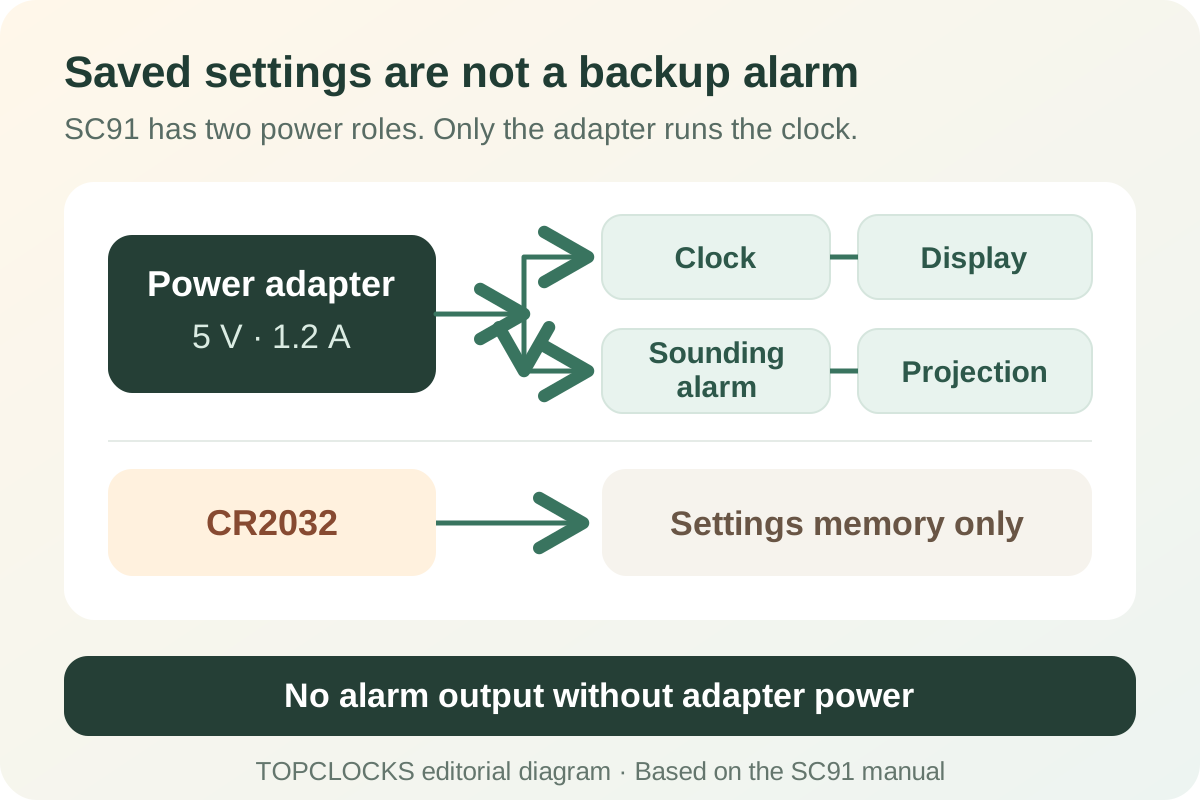
The supplied adapter runs the clock. The CR2032 coin cell saves settings; it does not keep the display, projector, or sounding alarm operating without external power.
Documentation-based review, not a TOPCLOCKS hands-on or laboratory test. Reference-based illustrations do not establish measured brightness, loudness, accuracy, or reliability.
The decisive distinction
Settings memory is not alarm powerThe CR2032 saves settings. Normal clock, alarm and projection output require the adapter.Check power limitsCompare the clock type
Projection alarm clocksCompare projector controls, alarm schedules, sensor features and power requirements across projection clocks.Open the buying guideQuick Verdict
SC91 Suits Two Weekly Alarms and a Darker Clock Face
Choose the SMARTRO SC91 for time on the ceiling, outdoor readings on the nightstand, and two alarms that do not have to ring every day. Each alarm can follow weekdays, weekends, or the whole week. The projector has high, low, and off settings, separate from the four LCD backlight states. Compared with a simpler weather projector, these schedule and light controls are its main attractions.
Its main compromise is power: the supplied adapter runs the clock. The CR2032 coin cell saves settings; it does not keep the display, projector, or sounding alarm operating without external power. “Wireless” describes the outdoor sensor connection, not a cordless bedside clock. If an alarm must work during an outage, that requirement should decide the purchase before the weather graphics do.
This is a documentation-based review of SC91, identified by Amazon US ASIN B07N2PWWW6. The findings come from SMARTRO's model page, support-linked manual, and exact retail listing. TOPCLOCKS has not measured its brightness, sound level, sensor accuracy, or long-term reliability. The illustrations explain placement and settings; they are not evidence of a physical test.
Choose SC91 if
- You want separate weekday or weekend patterns for two stored alarms.
- You need to dim the projected image independently of the clock face.
- Indoor and outdoor readings are useful, without an app or Wi-Fi setup.
- An accessible outlet is part of the permanent bedside arrangement.
Choose another route if
- You require a sounding alarm after mains power fails.
- You need a verified adjustable-focus mechanism or automatic radio time.
- Each individual day needs a different wake time.
- A selectable sound library, radio alarm, or private vibrating wake signal is essential.
Exact Model
Check SC91, Not the Similar SC31B
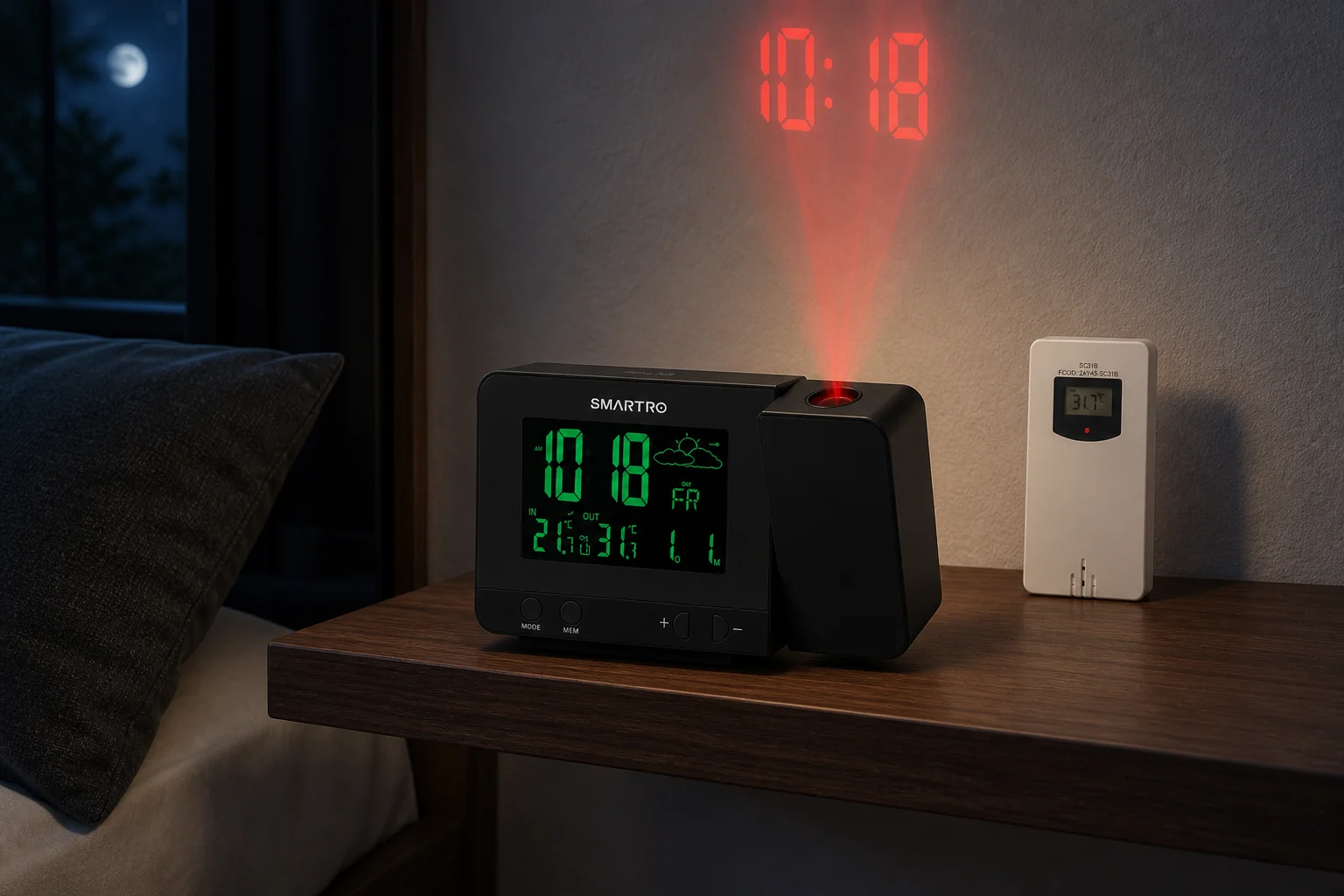
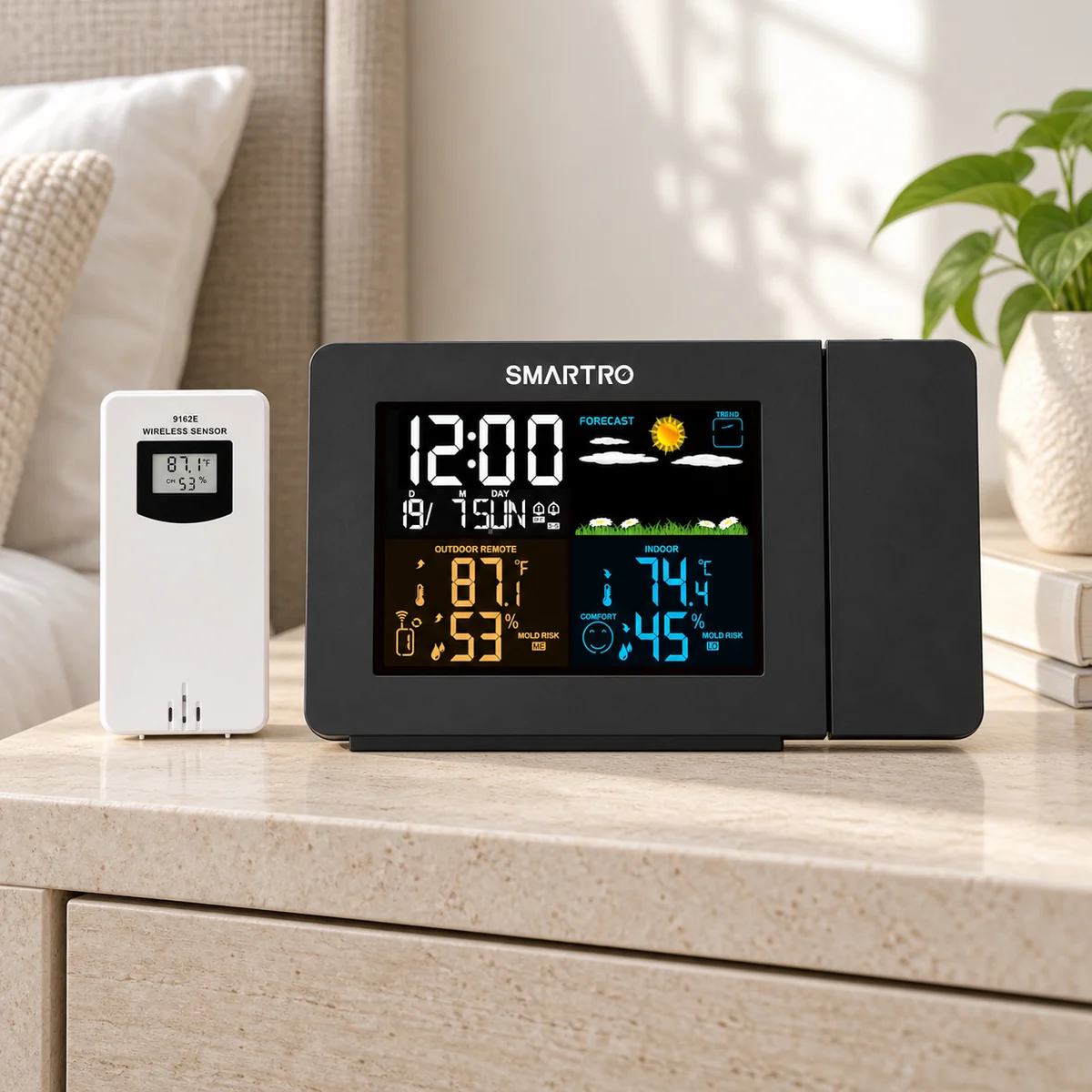
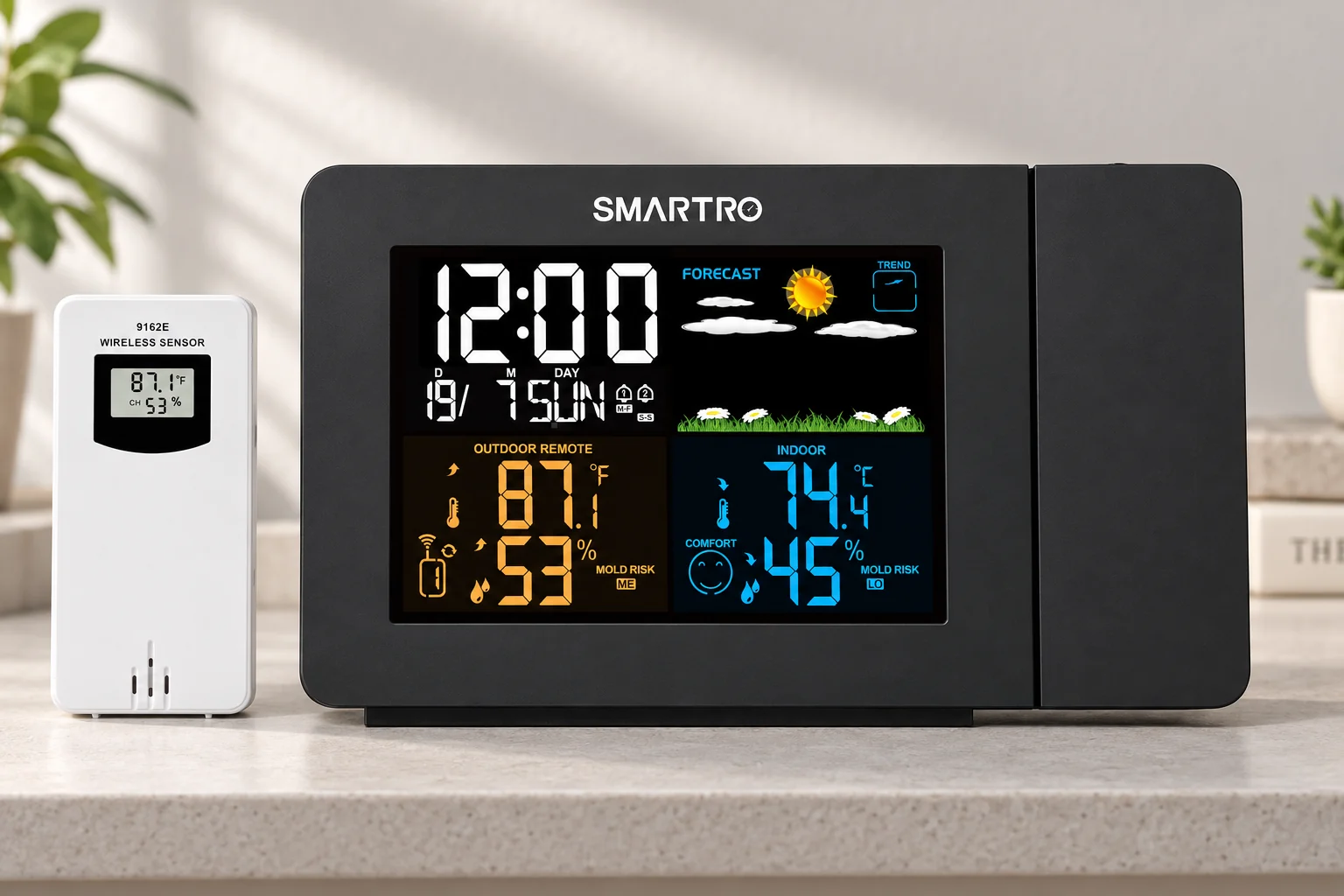
SMARTRO sells several clocks with projected time and wireless weather readings. Their appearance and category names are not enough to identify their controls. This review concerns the black SC91, with its color weather display, right-side projector, and supplied white remote sensor. The manufacturer's product record maps to B07N2PWWW6; its support page supplies a manual explicitly labeled SC91.
SC31B is a different model. In particular, do not transfer that clock's battery behavior or assume its LCD brightness settings prove that it has the SC91's separate projector dimmer. The SC31B review covers its own documented limits.
Check the model label and supplied instructions when the order arrives, especially if the seller changes a listing title or bundle. A replacement sensor also needs a model-specific compatibility check. A product advertised for another SMARTRO weather station is not automatically compatible because the case looks similar.
The manufacturer's dimension graphic shows a body about 6.6 inches wide and 3.9 inches high, with a 4.5-inch diagonal LCD. Those are different measurements: the screen diagonal does not describe the whole clock. Leave access around the side controls and projector, as well as a route for the adapter cable. A 7 × 6 × 2.4-inch measurement in the product data describes the package, not a confirmed bedside footprint.
Power and Backup
The Coin Cell Saves Settings, Not the Morning Alarm
Normal operation uses the 5 V, 1.2 A adapter specified in the manual. The CR2032 serves a different job: retaining manually entered settings. Treat these as separate paths. Keeping an alarm time in memory is useful after reconnecting power, but it does not mean that a buzzer can sound while the adapter is disconnected.
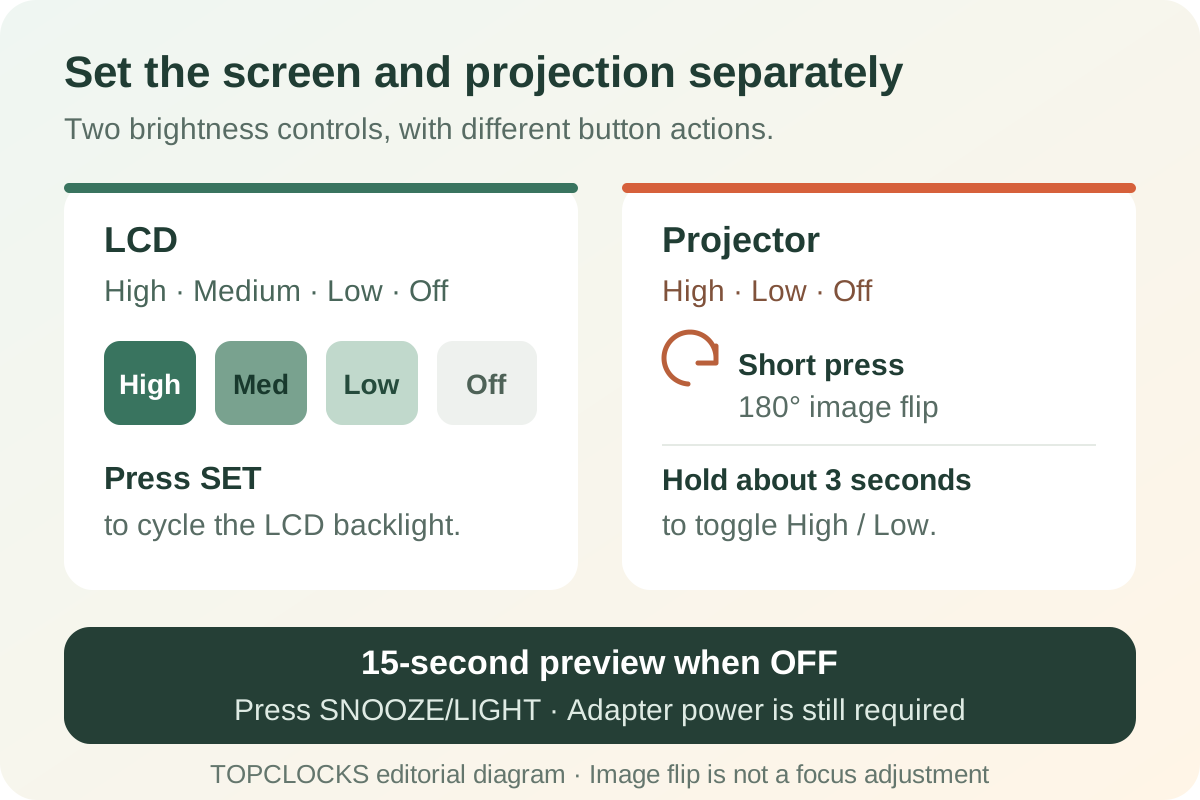
The projector's brief activation mode is easy to misread. With the projector switched off, the top control can reveal the projection for approximately 15 seconds. That behavior belongs to the powered clock. It is not a battery-only projection mode. Replacing the coin cell will not turn the SC91 into a portable projector.
For a fixed nightstand with stable power, this may be an acceptable trade-off. For a flight or shift that cannot be missed, use a separate, charged or battery-operated alarm whose wake signal does not depend on the same outlet. A second saved time on the SC91 is not an independent backup: both alarms share the clock and its power supply.
After moving the unit or restoring power, inspect the current time, day, enabled alarm icons, and next intended schedule. Rehearse the audible signal while awake. This does not prove future reliability, but it catches a wrong day setting or disabled alarm before it matters. Use the supplied adapter and the manufacturer's replacement guidance rather than selecting a power supply by connector shape alone.
Projection Setup
Measure the Clock-to-Surface Distance Before Chasing Focus
SMARTRO recommends a dark-room projection distance of 1–3 meters, approximately 3.3–9.8 feet. Measure from the projector to the actual wall or ceiling patch, not from the floor to the ceiling. A taller nightstand or an angled wall position changes that path. The range is setup guidance, not a guarantee of sharp digits on every surface.
SC91 projects time and temperature. The temperature alternates between indoor and outdoor readings every five seconds. If you want a static, time-only view, the checked instructions do not establish that you can remove the other projected fields.
The 180-degree image flip changes which way the digits read. It is separate from physically aiming the projector: SMARTRO's gallery also labels a 180-degree movement of the projector arm. A short press of the circular-arrow control flips the image. Neither feature is an adjustable focus wheel; that mechanism is not established in the checked SC91 instructions. If manual focusing is essential, compare the Magnasonic EAAC601.
There is a source discrepancy worth knowing before installation. The same official gallery graphic advertises 5–13 feet, while the manual and product text recommend 1–3 meters. This review uses the manual's 1–3-meter interval as the starting point. The wider marketing range is not an independently verified promise, and moving farther away is not a substitute for checking readability in your room.
For blurred or awkwardly placed digits, first confirm external power and projector mode. Then reduce ambient light, choose a plain surface within the documented distance, adjust the aim, and use the image flip if needed. Judge readability from the pillow position. If the result remains unsuitable, do not assume an undocumented focus control will solve it; another placement or another model may be necessary.
Nighttime Light
Set the LCD and Projector Separately
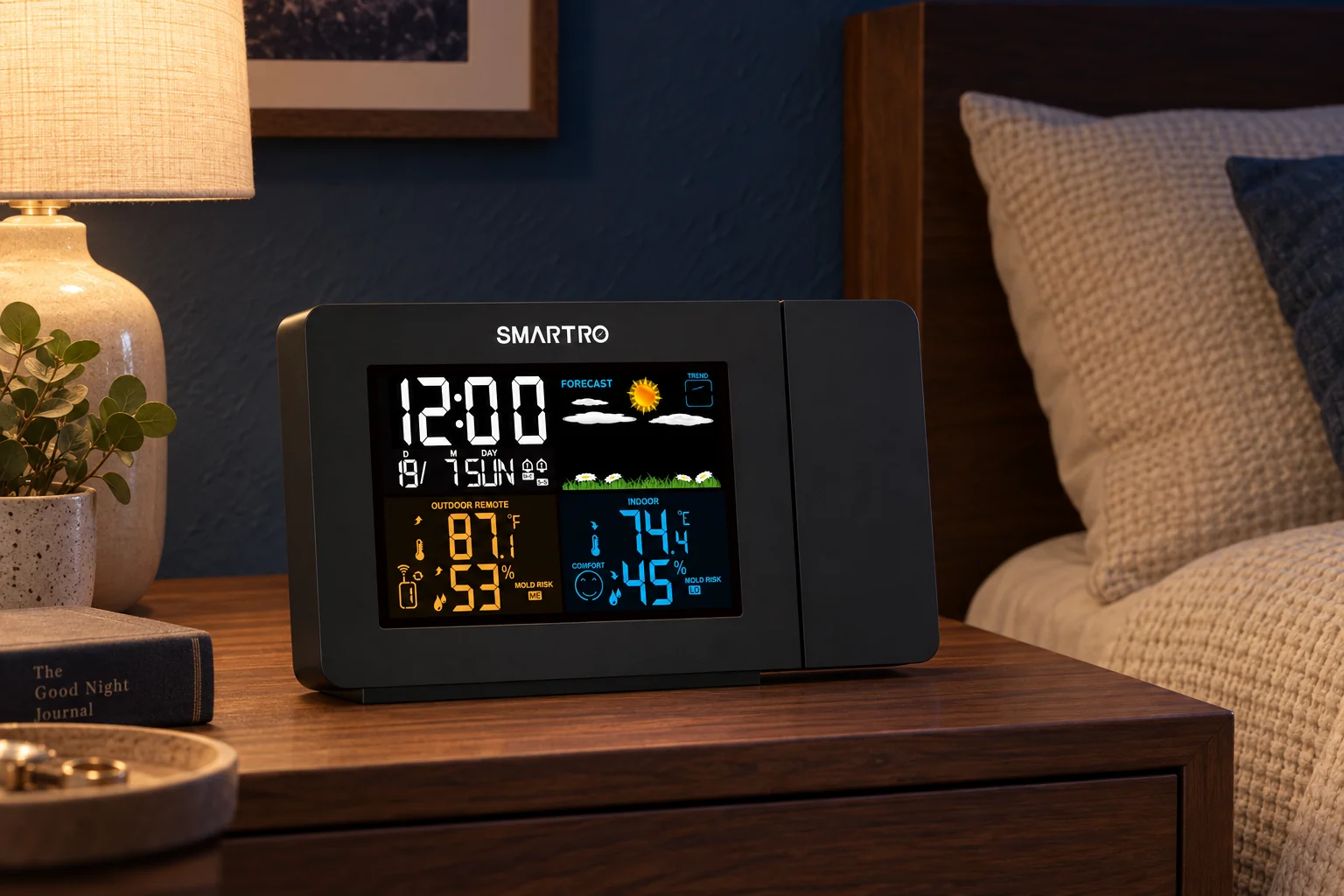
The main display has four backlight states, including off. The projector separately offers high, low, and off. This lets the owner reduce light from the clock face while retaining a ceiling view, or keep the projector off until a brief check is wanted. A retailer's claim of “four brightness levels” is less useful than knowing which light it controls.
Press SET to cycle the LCD through high, medium, low, and off. For the projector, holding the circular-arrow button for three seconds changes high/low brightness; a short press flips the image instead. Use the projector's separate switch for off. When the LCD is off, the top snooze/light button brings it back briefly for about 15 seconds. These are manual choices; automatic ambient-light adjustment is not documented.
Begin the first nighttime setup with the LCD low or off and the projector low. Adjust after the room reaches its usual sleeping conditions; daylight can make a reasonable night setting look unusably dim. An off setting for these two displays is not a measured promise of total darkness from every indicator in the room.
Check the intended alarm state after changing settings. Covering the front of a clock is a poor substitute for learning its controls because it can hide the alarm indicators as well as the time. For more ways to compare actual display-off behavior, use the dimmable display guide.
Weekly Scheduling
Two Alarms Can Follow Different Day Patterns
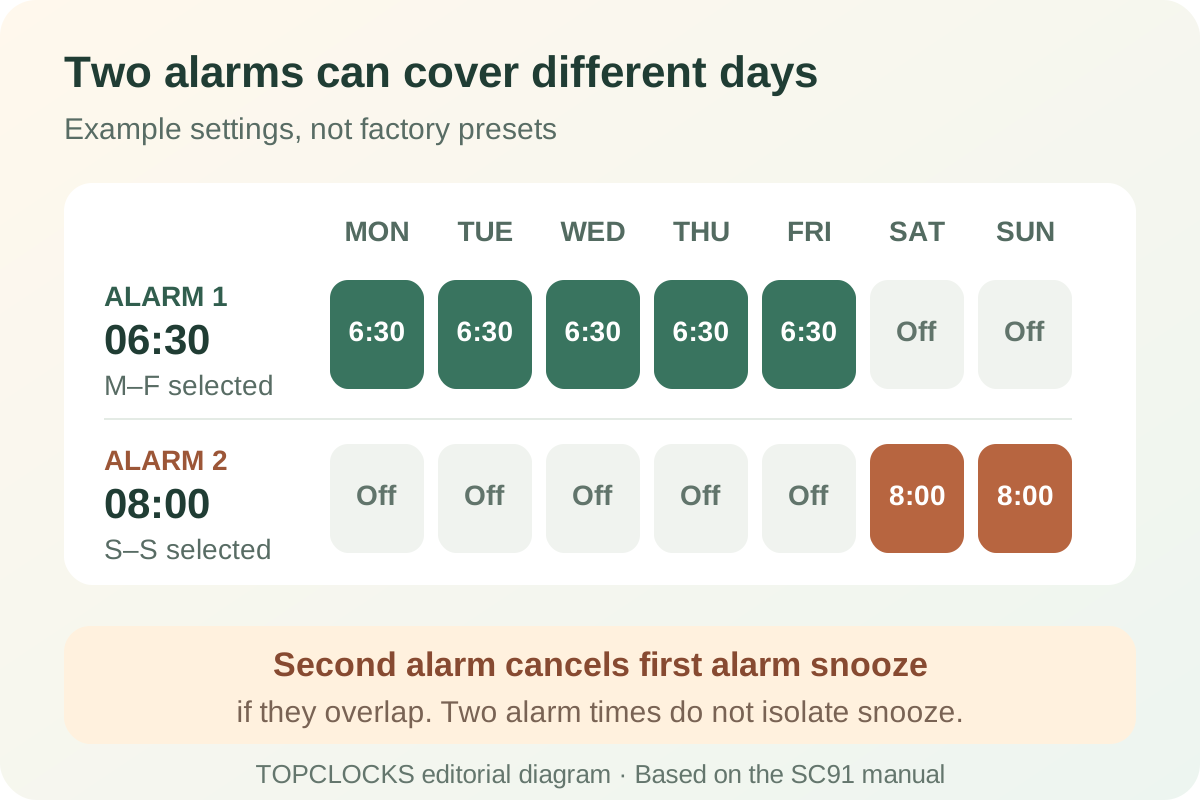
Each stored alarm can use Monday–Friday, Saturday–Sunday, or all-week operation. That is more flexible than two alarms that repeat daily, but less flexible than a calendar with a unique time for every day. Someone with the same weekday start and a later weekend start can use the two banks directly. A rotating shift pattern may require manual changes.
Both the time and the day pattern need to be correct. An alarm set for 7:00 with a weekday pattern will not serve as a Saturday reminder merely because its bell icon is enabled. Confirm the clock's date and weekday during initial setup. SC91's time is set locally; a wireless outdoor sensor does not synchronize it to WWVB or internet time.
Alarm 1 and Alarm 2 have their own physical on/off switches. Setting the time and recurrence does not replace enabling the appropriate bank. The settings screen exits after about 30 seconds without input, so check the saved result if you pause midway through programming. The clock offers 12- and 24-hour time; make the AM/PM check part of setup when using the 12-hour format.
Two people can store different times, but the sound and projection still occupy the shared bedroom. The product does not provide two private wake signals. If the earlier alarm should leave a partner asleep, the couples guide makes that distinction before comparing extra features.
Before a holiday, check which alarm bank is enabled and which days it covers. Look at the saved day, time and active icon rather than relying on a remembered button press from the previous night.
Sound and Snooze
A Second Alarm Can Interrupt the First Alarm's Snooze
The documented audible cycle lasts two minutes if left alone. Snooze can be set from 5 to 60 minutes or switched off. The top snooze/light control delays an active alarm; dismissal and permanent arming are different actions. Follow the labeled controls and confirm the final icon instead of treating every button press as “off.”
During the alarm, a button other than snooze/light dismisses the current occurrence. The bank can still ring at its next scheduled time. The dedicated on/off switch is the control for disabling it. To leave an active snooze, the instructions describe another button press or holding snooze/light for two seconds. Practice these actions with a near-future alarm; morning muscle memory should not depend on guessing which kind of stop occurred.
If the second alarm sounds while the first is snoozing, the first alarm's snooze stops. Rehearse this interaction if you use closely spaced alarms: the two banks do not keep returning as independent chains of reminders.
An illustrative setup makes the consequence clearer. If alarm one begins at 6:30 and is snoozed past alarm two's 6:35 start, the second event takes over the active sequence. Those times are an example, not a factory preset. Test the same relationship with your own settings while awake before relying on repeated reminders.
The manual says the tone changes four times within its two-minute cycle. That is not a menu of four user-selectable sounds. No sound library or exact-model sound-pressure measurement was established in the checked documents. The ordinary audible alarm should not be promoted as a verified heavy-sleeper or hearing-accessibility solution. If sound has already proved insufficient, start with the Alarm Clock Finder instead of assuming a longer snooze range solves the wake problem.
Outdoor Sensor
Pair Nearby, Then Check the Final Sensor Location
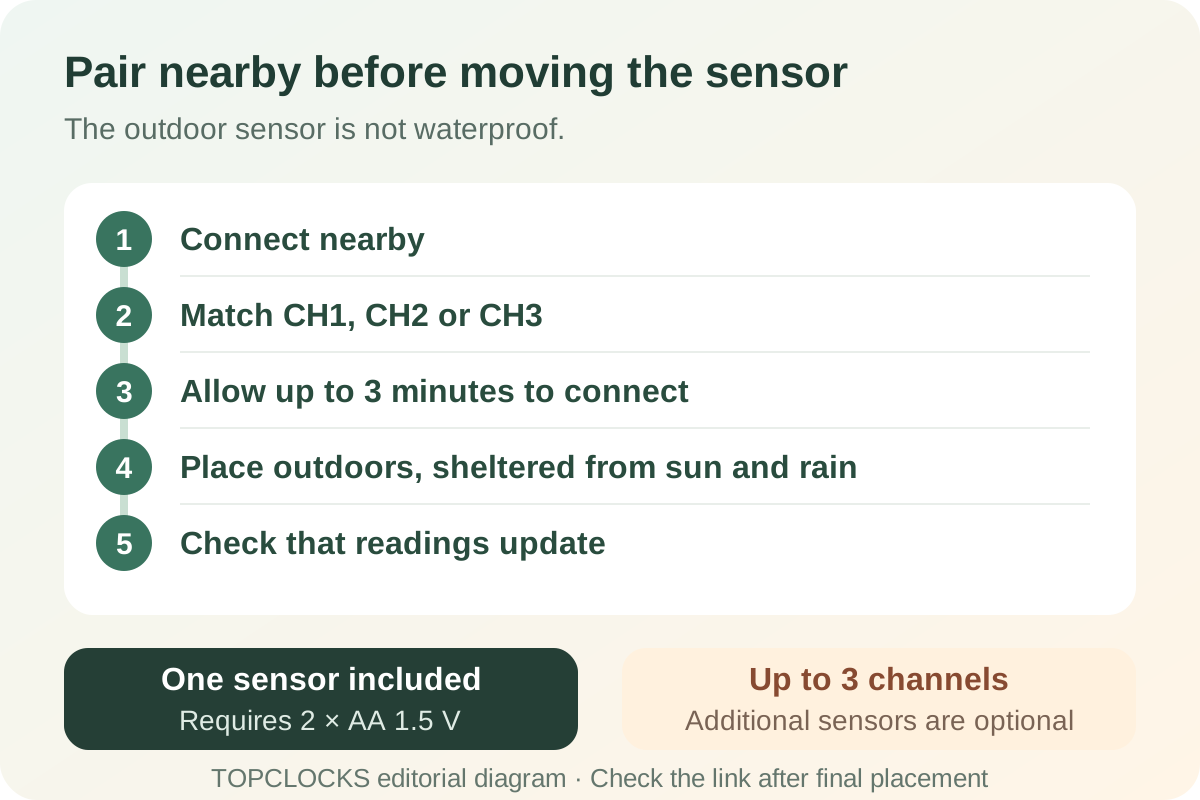
The package includes one remote sensor, while the clock supports up to three channels. Additional channels do not mean three sensors are supplied. The official open-area transmission guidance is up to 200 feet, or 60 meters; walls and the actual placement make that a different question from the distance written on a listing.
The sensor uses two 1.5 V AA batteries. Establish a reading close to the powered base before installing it outdoors. Match CH1, CH2, or CH3 on the sensor to the displayed channel and allow up to three minutes for initial reception. The sensor's TX button sends a reading; holding the receiver's +/CH button for three seconds starts reception. If a reading later disappears, check the channel and sensor batteries before resetting the clock and its alarms.
After moving the sensor, verify that the base continues receiving updates in the final location. SMARTRO says the sensor is not waterproof: put it under a suitable porch or eave, protected from direct rain and sunlight. “Outdoor” does not mean unrestricted exposure. A locally heated or sunlit position can also make the displayed number a poor guide to the conditions you intended to measure.
Watch the IN/OUT indication when reading the ceiling display. A change in the projected temperature may be the normal indoor-to-outdoor cycle, not a sudden change in the room.
For replacement parts, choose a sensor explicitly listed for SC91. SMARTRO's catalog distinguishes compatible sensor families; its other weather-station sensors are not universally interchangeable. Confirm compatibility before ordering, especially where a listing combines multiple model names.
Weather Readings
The Forecast Is a Local Trend, Not an Internet Weather Service
SC91 combines temperature, humidity, trend information, and a forecast graphic. SMARTRO describes the forecast as a prediction for the next twelve hours based on pressure changes. It is not a downloaded forecast for a postal code, and the sensor's wireless connection does not add Wi-Fi, an account, or phone control.
Use the weather panel for local context. For a weather-sensitive decision, consult a full weather service as well: a small forecast icon on your nightstand cannot establish conditions at a distant destination.
The display also has comfort and mold-risk indications. They are device indicators, not a building inspection, diagnosis, or proof that a room is safe. This review makes no health claim from them. If the main buying need is reliable environmental monitoring, assess the measurement requirements separately from whether the clock is pleasant to use at bedtime.
The listed temperature ranges are 15–122°F indoors and −40–158°F for outdoor readings, with humidity from 19% to 96% RH. These are reporting ranges, not proof of measurement accuracy or permission to operate every component at those extremes. The clock stores minimum and maximum readings; holding MAX/MIN for more than two seconds resets those records to the current values. An automatic midnight reset is not established.
A flashing frost symbol appears around 30.2–37.3°F, but it is a visual indicator, not a documented audible frost alarm. The checked manual also does not establish user-programmable high/low temperature or humidity alerts. Buy it for convenient readings and trend context, not for an environmental warning system it has not been shown to provide.
Model Comparison
SC91 Adds Day Patterns; EAAC601 Adds Focus and Radio
Choose between these models by the control you would miss. SC91's strongest documented combination is independent projector dimming and weekday/weekend dual alarms with weather readings. SC31B offers a simpler weather-projector comparison, while EAAC601 changes the emphasis toward adjustable focus and AM/FM waking.
| Requirement | SMARTRO SC91 | SMARTRO SC31B | Magnasonic EAAC601 |
|---|---|---|---|
| Projector controls | High/low/off; 180° image flip and advertised arm movement; focus wheel not established | 180° image flip; separate projector dimming not established | Focus wheel, physical swivel, and image flip |
| Schedule | Two alarms with weekday/weekend/all-week patterns | Two daily alarm times; day-pattern automation not established | Two alarms with weekday, weekend, all-week or one selected weekday patterns |
| Useful extra | Outdoor sensor and indoor/outdoor humidity | Outdoor weather readings | AM/FM wake source and indoor temperature |
| Power caution | CR2032 saves settings only | Two AAA cells retain settings and permit a brief view; audible outage operation is not established | Magnasonic support says the alarm sounds in an outage. The specification lists “Sure Alarm: No” without explaining the field for EAAC601. The exact backup signal is unclear. Use a separate backup for a critical wake-up. |
These are documented feature differences, not side-by-side measurements of image sharpness or alarm loudness. Read the SC31B review or EAAC601 review for their own boundaries. The Projection Alarm Clocks guide includes the broader room-fit comparison.
Editorial Score
SC91 Earns an 8.5/10 Research-Based Fit Score
The TOPCLOCKS Projection method evaluates documented controls and ownership requirements. It does not measure optical quality or predict whether a particular sleeper will wake. This is not an Amazon customer rating, and no customer-star average is used in the calculation.
The manual documents orientation and distance guidance; the official gallery labels 180° arm movement. Adjustable focus is not established.
Local arming, dismissal, snooze and timeout are explained; a selectable sound library is not established.
Two retained times can use different weekday, weekend or all-week patterns.
The documented clock and alarm setup does not require an app or network.
Projector high/low/off is separate from the LCD backlight, which also includes off.
No app, account or subscription is required for the core clock task.
Settings-only backup is clear, but it does not supply an outage alarm.
The official SC91 route, matching manual and exact US retail identity are traceable.
The weighted feature base is 8.875. Applying the method's 0.90 documentation confidence gives an evidence deduction of 0.3875, leaving 8.4875 and a displayed score of 8.5. The research cap is 8.8. The calculation credits the manufacturer's documented controls, not measured optical performance. A requirement such as outage operation can still make the model unsuitable regardless of the total.
First-Morning Check
Verify the Complete Setup While You Are Awake
Rehearse before an ordinary morning. Check the alarm first, then the display and sensor, so a missing weather reading does not distract from a disabled wake signal.
- Confirm the delivered SC91 identity, supplied adapter, current time, date and weekday.
- Set one alarm a few minutes ahead with the correct day pattern. Enable it and inspect the icon.
- Hear the alarm, try your chosen snooze interval, then dismiss it. Check what remains enabled.
- If using both banks, rehearse their overlap rather than assuming both snooze sequences continue.
- Set LCD and projector brightness separately; inspect the image from bed in normal nighttime light.
- Pair the sensor nearby, then confirm updates from its final sheltered location.
- Prepare an independent alarm when losing mains power would make the morning unacceptable.
Keep the confirmed settings simple enough to inspect again after a move, power interruption, holiday, or schedule change. If the problem persists after the documented checks, use SMARTRO support rather than opening the unit or experimenting with unverified power supplies.
FAQ
SMARTRO SC91 Questions Before Buying or Setting It Up
Does the SMARTRO SC91 work on batteries?
The clock's normal operation requires its adapter. The CR2032 saves settings; it does not operate the projector, display or audible alarm during an outage. The remote sensor has its own battery supply.
Can I turn off the screen and keep projection on?
The LCD includes an off state and the projector has separate high, low and off controls. Configure both on the powered clock and verify the desired alarm remains enabled.
Why does the projection turn off after a few seconds?
With projection switched off, the top control can activate it for about 15 seconds. Check the projector's continuous mode and external power before treating a brief display as a fault.
Is the SC91 an atomic or Wi-Fi alarm clock?
No such time-sync function is established in its manual. Time is set locally. Wireless refers to environmental readings from the remote sensor, not internet or radio-controlled time.
Can each alarm have a different weekday schedule?
Each alarm can use weekdays, weekends or all week. It is not a seven-day calendar with a separate time for every individual day.
Does SC91 have adjustable focus?
An adjustable focus wheel is not established in the checked official instructions. They document a 180-degree image flip and recommend a dark-room distance of 1–3 meters.
How many outdoor sensors come with it?
One sensor is included. Up to three channels are supported, with additional compatible sensors bought separately. Check explicit SC91 compatibility before ordering a replacement.
Is SC91 better than SC31B?
SC91 is the stronger documented fit when you need day-pattern alarms and separate projector dimming. It is not automatically better for every power, room or budget requirement; SC31B has different operating boundaries.
Sources and Limits
Official SC91 Documentation Supports This Review
The primary sources were checked on September 8, 2026. Specifications describe available controls, not TOPCLOCKS test results. Current prices, delivery estimates and stock may change, so they are not frozen into this review or its structured data.
- — exact model, included sensor, display and range guidance.
- — power, projection, alarms, snooze, sensor and weather functions.
- — verify the current matching instructions and contact route.
If power-cut operation or adjustable focus is your deciding requirement, open the projection comparison before buying SC91. Its locally set weekly alarms, separate light controls and nearby weather readings do not remove those limits.